 | Created by: Leigh Snaith-Brunton aka The Sharpie Domino Queen and Design Team Member Description: Steampunk card featuring border stamps by Lost Coast Designs to create a stamped basket weave background. I used Marvy Le Plume Permament markers to colour everything in a grey monochromatic colour scheme. You can also get the same effect with Copic markers too. I also used the following tools to create my background panels: Spellbinders Label Two dies, Tim Holtz Alterations Clocks Texture Fades embossing folder and the Cuttlebug Clockworks embossing folder. Stamps Used: Lost Coast Designs rubber stamps - all are available at Blockheads: Steampunk Typewriter Girl, Measuring Tape border, Bingo border and Numbers border. For step by step instructions for this card, visit my full blog post on Leigh SB Designs. |

Showing posts with label Alcohol-based Permanent Markers. Show all posts
Showing posts with label Alcohol-based Permanent Markers. Show all posts
Wednesday, April 25, 2012
"Measure" Steampunk card featuring Lost Coast Designs by Leigh S-B


Friday, December 30, 2011
Take Flight with Art Parts Modeling Film

 I created these using Wendy Vecci Art Parts and Modeling Film. The Modeling Film is a really neat clear plastic sheet that you can stamp on, cut out or die cut and mold into curved shapes by heating it with a heat gun. I used StazOn Metallic and StazOn Jet Black to stamp with. Some of them I colored with Marvy Alcohol Ink Markers on the reverse side of the ink.
 Wednesday, December 28, 2011
Inspired by a Poppy

Head over to Dietrich Designs: Inspired by a Poppy: Merry Christmas , everyone! Did you all enjoy your holiday? Did you get any crafting goodies under the tree? I bought crafting supplies ...
Thursday, December 22, 2011
Last Minute Christmas Preparations of a Harried Housewife
 Hi Blockheads!
I have a fun card to share with you today that uses one of Di's hilarious images from the Harried Housewives set and a background image from the Background and Borders full sheet.
This card depicts my frame of mind as I finish up preparations for the Holidays. LOL The image is colored with Copic Markers.
For all the details, click over to my blog, Dreaming and Creating. Hope you are having a great day. I wish you all the best this Holiday Season.
Karen McAlpine
Wednesday, December 21, 2011
JudiKins Eclipse for Creating Masked Areas


Products Used:
        |

I've been participating in sketch challenges a lot lately. I really like having the layout defined so I can focus simply on colors and images that I want to use. People who use a lot of patterned paper really like them so they can use up scraps. I don't use a lot of patterned paper so I'm often using more cardstock than I normally would when making a card. Read more for step by step instructions for creating this card with masking.
Tuesday, December 20, 2011
So little time this holiday?

Wednesday, December 14, 2011
More Isle of Aud


Here is my list of products:
          |
Basic Instructions: All of the mottled backgrounds were created by applying Distress ink directly to
Thursday, November 24, 2011
How To Colour A Vintage Santa - Marvy Le Plume Permanent/Copic Markers Tutorial by Leigh S-B!
Happy Thanksgiving Everyone!
I'm super delighted to be back today with another Marvy Le Plume Permanent markers 'How To' tutorial! I'm featuring the Marvy Le Plume Permanents in a series of tutorials but you can follow along easily with Copic markers too! Stacey, the wonderful owner of Blockheads Paper Arts, has provided a great Marvy to Copic substitute Chart to take the guess work out of it for you! So grab your markers and lets get started on 'How To Colour A Vintage Santa'!
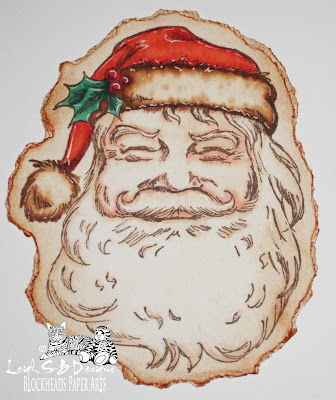
In this tutorial I'm going to show you how to colour this gorgeous Santa image which is on the exclusive Blockheads Paper Arts An Illustrated Christmas stamp sheet by mainly using the Marvy Le Plume Permanent Blending Pen N900 (or Copic 0 Colourless Blender) to blend and soften the colours. This is a great technique for colouring 'white' areas in your stamped images for a beautiful subtle effect!

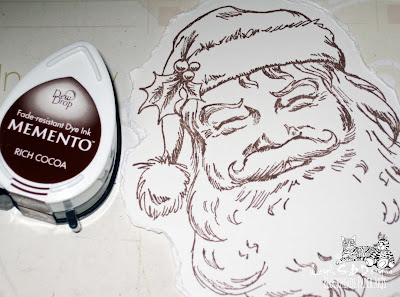
Stamp Santa onto Neenah Solar White cardstock with Memento Rich Cocoa ink.
I tore the edges of my Santa coz I was going for a vintage distressed look for the card I used him on.
You can see my finished card on my blog at Leigh S-B Designs!
We are going to use the following Marvy Le Plume Permanent markers:
N900 Blending Pen
Red (R) 812, R815, R817
Orange Red (OR) 823, OR827
Orange Yellow (OY) 848
Green (G) 673, G679
as well as a red Prismacolor pencil, a white gel pen and Tea Dye Distress Ink
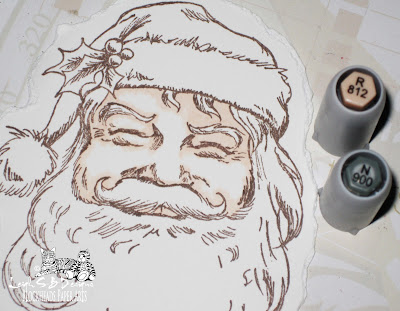
Apply R812, which is a pale flesh colour, by outlining just the stamped lines of the face and filling in more of the 'shadow' areas. I decided my light source was coming from the front and slightly to the left so the right side of Santa's face will be more shadowed. Go over all the colour with the Blending pen (N900) to soften the harsh edges. Don't worry about going over the stamped image because the Memento ink doesn't smear and is perfect for use with alcohol-based markers.
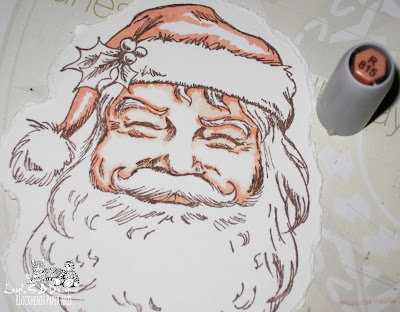
Apply R815 to the same areas of the face but concentrate more on where the 'shadows' would be. So mainly along Santa's brow where his hat sits, his eyebrows coz remember he does have bushy eyebrows, the creases of his eyes, nose and along his beard line. I also started on his hat at this point. I used R815 as the highlight areas on his hat so I started with the lightest colour.
Apply R815 to the same areas of the face but concentrate more on where the 'shadows' would be. So mainly along Santa's brow where his hat sits, his eyebrows coz remember he does have bushy eyebrows, the creases of his eyes, nose and along his beard line. I also started on his hat at this point. I used R815 as the highlight areas on his hat so I started with the lightest colour.
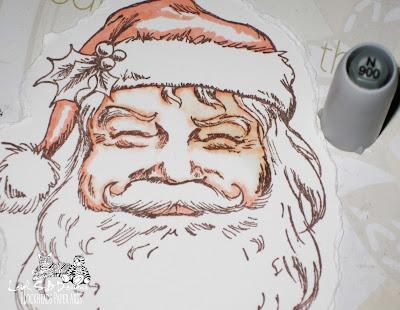
Back to the face - blend all the R815 areas with the Blending pen.

Back to the hat - build up the colour on Santa's hat with R817.
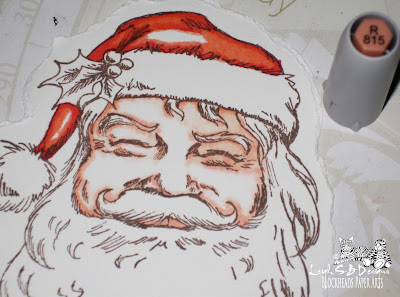
Blend all the R817 areas by using R815 as the blending tool instead of the colourless Blender this time.

I added more R817, blended with R815 and did the same again until I was happy with the result.
Usually a stamp image will indicate for you where your shadows should be with cross hatching or darker lines which darkens particular areas. So in this case that's where I concentrated applying the darker red areas on the hat.
Usually a stamp image will indicate for you where your shadows should be with cross hatching or darker lines which darkens particular areas. So in this case that's where I concentrated applying the darker red areas on the hat.
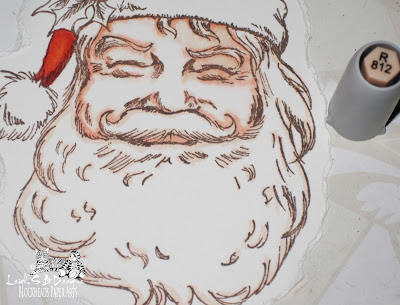
Now for his beard, mustache and eyebrows - I lightly applied R812 on and around the stamped lines of all the hair areas.
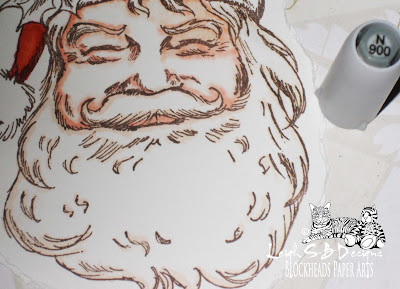
Go over all the same hair areas again with the Blending pen (N900) to soften the harsh edges.
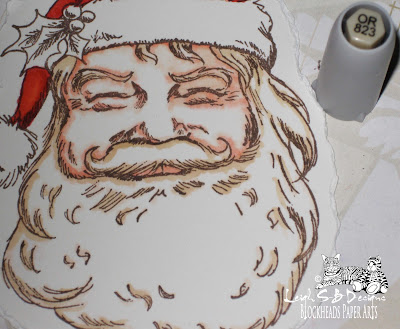
Apply OR823 to the same areas to add shading and depth to the hair and blend again with N900 (Blending pen).
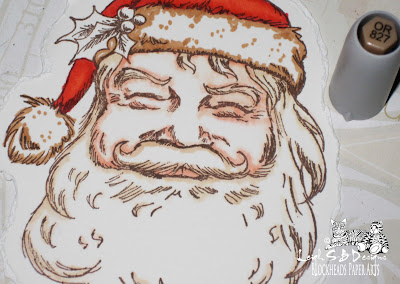
Apply OR827 to the white fluffy hat areas, concentrating the colour around the edges where the shadows would be.
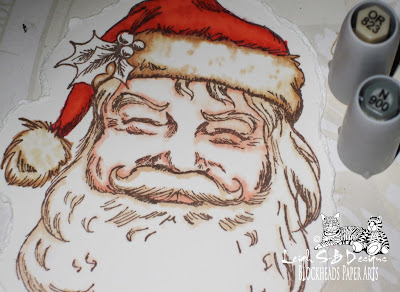
I blended over the same areas with OR823 to lighten and soften and then further blended away the sharp edges with N900 as the first step for this area to get a feel of where I wanted the colour to be for the white fluffy areas of Santa's hat. I'm using the sepia tones coz don't forget he's a vintage Santa!
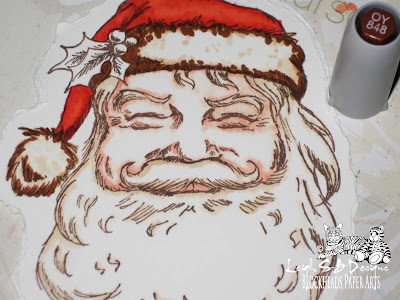
Apply OY848 for darker shading and depth.

Fill in with more OR827 and OR823, getting lighter towards the center of the white areas of Santa's fluffy hat. Don't forget to work on his hat pompom at the same time! Blend, soften and lighten the same areas with N900.
Tip: the Blending pen acts more like a bleaching agent and will lighten and leach away colour and you can get a nice watercolour effect. You can see that effect nicely in the white hat area in the photo below! You can also see I got some overbleed of the brown colour into the face area coz I used the Blending pen a lot but that didn't bother me coz it just looks like a shadow cast by the fluffy hat, especially when you're not looking at the image sooo closely ;0)
Tip: the Blending pen acts more like a bleaching agent and will lighten and leach away colour and you can get a nice watercolour effect. You can see that effect nicely in the white hat area in the photo below! You can also see I got some overbleed of the brown colour into the face area coz I used the Blending pen a lot but that didn't bother me coz it just looks like a shadow cast by the fluffy hat, especially when you're not looking at the image sooo closely ;0)
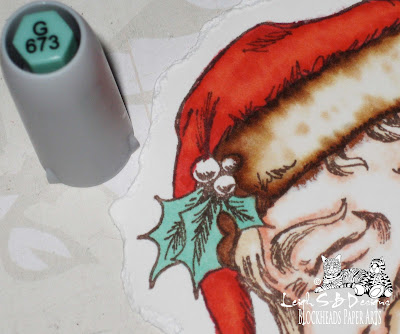
Now for the holly - colour in all the holly leaves with G673.

Add shading and depth to the leaves by applying G679 in the shadow areas which is basically where all the leaf detail and cross hatching of the stamped image is and make it darker where the leaves go under the berries.
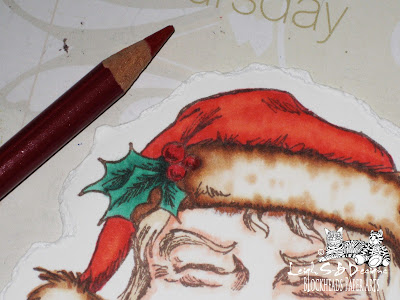
I wanted the berries to be appear more solid and opaque so they'd stand out from Santa's hat so I used a red Prismacolor pencil to colour them.

Finish off by applying highlights to the image with a white gel pen.
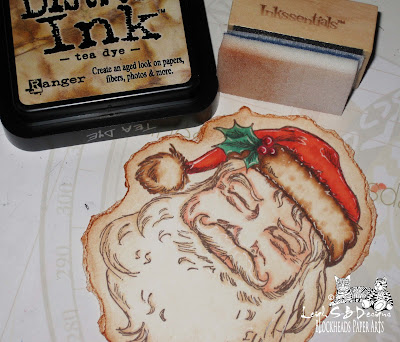
To complete my vintage Santa I aged the image by applying Tea Dye Distress Ink with an Ink Blending tool.

Here's my vintage Santa on the card I made for the Blockheads 'Sanded Colour Block' Technique Challenge! There's still plenty of time to join in the challenge for a chance to win the $25 gift certificate! You can read all about it here on the Blockheads Blog!
Then pop on over to my blog to see how I incorporated the technique into my card.
I hope you enjoyed my second tutorial on how to use Marvy/Copic markers. Click here if you missed tutorial #1 - "Passion for Purple" which is a blending tutorial demonstrating how to colour an entire image just using 4 shades of purple!

Then pop on over to my blog to see how I incorporated the technique into my card.
I hope you enjoyed my second tutorial on how to use Marvy/Copic markers. Click here if you missed tutorial #1 - "Passion for Purple" which is a blending tutorial demonstrating how to colour an entire image just using 4 shades of purple!
Thanks for joining me today and have a wonderful holiday weekend!
Happy Stamping :0)
Happy Stamping :0)
Leigh S-B
THE SHARPIE DOMINO QUEEN
Subscribe to:
Posts (Atom)